VFX Compositing Course: Learning Nuke, Mocha & Silhouette
Compositing is where a VFX shot actually comes together, tracked footage, rotoscopy mattes and render passes combined into one believable frame. A serious VFX compositing course needs to teach the three tools that dominate this stage of production: Nuke, Mocha and Silhouette. Here’s what each does, and how Rays VFX Academy’s course builds hands-on skill across all three.
Key Takeaways
- Nuke, Mocha and Silhouette each cover a different stage of the compositing workflow, not the same job three times.
- A VFX compositing course should give you hands-on time with all three, not just mention them on a syllabus.
- Rays VFX Academy builds compositing skill through Maya-Nuke integration, multi-pass work and the stereoscopic pipeline.
What Each Tool Actually Does
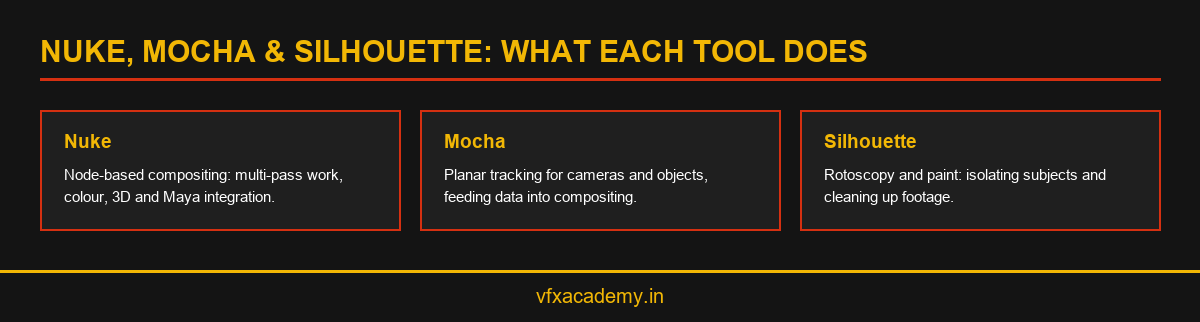
Ask which academy teaches Nuke, Mocha and Silhouette, and you’re really asking whether a course covers the full compositing toolchain. Nuke is the node-based compositor most studios build their final pipeline around, handling multi-pass compositing, colour work and 3D integration. Mocha is a planar tracking tool used for precise object and camera tracking without markers, often feeding data into Nuke. Silhouette specialises in rotoscopy and paint work, isolating subjects and cleaning up shots before they reach the compositor.
Understanding this division matters because it explains why a compositing course can’t skip any one of the three. Skipping Mocha means weaker tracking data going into Nuke. Skipping Silhouette means compositors spending time on rough rotoscopy instead of focused shot assembly. A course that only teaches Nuke is teaching the last step of a three-step workflow.
How Rays VFX Academy Sequences Compositing Training
The course builds toward compositing gradually rather than starting there. Rotoscopy and chroma keying come first, which is where Silhouette-style tools get their first real use. Match moving and camera tracking follow, introducing tracking workflows similar to Mocha’s planar tracking approach. Only after these foundations does the course move into Maya-Nuke integration, multi-pass compositing and the stereoscopic pipeline.
This sequencing mirrors how compositors actually work day to day. For a look at how compositing connects to broader VFX artist roles, see our guide on VFX artist course skills and career roles.
What to Ask Before Choosing a Compositing Course
Ask exactly how many hands-on hours are spent inside Nuke versus how many hours are spent watching demonstrations. Ask whether tracking work uses Mocha specifically, or a generic built-in tracker. Ask whether rotoscopy training happens in Silhouette or in a general-purpose tool repurposed for the task. The specificity of the answers tells you more than the syllabus page ever will.
It’s also worth asking whether compositing exercises use real production footage or clean stock clips. Real footage has grain, motion blur and lighting inconsistencies that stock clips rarely include, and learning to composite around those imperfections is what separates classroom compositing from studio-ready compositing.
Conclusion
Nuke, Mocha and Silhouette each solve a different part of the compositing problem, and a genuine VFX compositing course needs hands-on time with all three. Rays VFX Academy’s 6-month course builds toward exactly this combination. See the full curriculum in our VFX course in Kochi guide, or book a free demo class to see the compositing workflow directly.
Frequently Asked Questions
Do I need to learn Nuke, Mocha and Silhouette separately?
They’re distinct tools covering different stages, tracking, rotoscopy and final compositing, so a complete course should teach all three, even if not with equal depth.
Which tool should a beginner learn first?
Rotoscopy and tracking fundamentals typically come before advanced Nuke compositing, since compositing depends on clean mattes and tracking data as inputs.
Is Nuke difficult to learn for beginners?
Nuke’s node-based interface has a learning curve, but structured training that builds up from rotoscopy and tracking makes the transition into compositing more manageable.
Does Rays VFX Academy teach all three tools?
Yes. The course builds toward Maya-Nuke integration and multi-pass compositing through modules that include rotoscopy, chroma keying, matte painting and camera tracking.
Can I get compositing work without knowing Mocha or Silhouette?
It’s possible for narrow roles, but most production pipelines expect familiarity with dedicated tracking and rotoscopy tools alongside a compositor’s main software.

You may also like
VFX Editing Course: From Video Editing to Full VFX Production

VFX Artist Course: Skills, Software & Career Roles