Blender VFX Course: Learning VFX on a Free, Industry-Relevant Tool
A blender vfx course appeals to students who want to start learning without an upfront software cost, and the good news is that Blender is genuinely capable, not a stripped down demo version of real tools. Many prospective students assume free software must be inferior, which is not actually true for Blender’s core capabilities. This guide covers what Blender can actually teach you, how it compares to industry standard Maya, and how it fits alongside structured training such as Rays VFX Academy’s course.
Key Takeaways
- Blender is a free, open source 3D application capable of production quality modelling, animation, and rendering.
- Blender’s pipeline logic closely mirrors Maya, which means skills built in one transfer reasonably well to the other.
- Free tool access does not replace structured, studio-connected training, but it is an excellent way to start practising early.
Why Blender Is a Genuinely Capable Free Tool
Blender has grown substantially in capability over recent years, and some studios now use it alongside commercial 3D computer graphics software in real production work. For a student exploring a blender vfx course, this means the skills learned are not a watered down substitute, but genuinely transferable to professional work in many contexts.
The free cost removes a real barrier for students who want to test their interest before committing money to formal training. A student can install Blender, follow structured tutorials, and start building modelling and animation fundamentals without any upfront financial commitment, which matters significantly for families still deciding whether to invest in a full course.
It is worth being clear about what free access does not solve. Blender removes the software cost barrier, but it does not replace structured feedback, a sequenced curriculum, or exposure to a real production pipeline, all of which shape how quickly a self-taught student’s skills actually mature toward production readiness.
Blender’s active open source community also means documentation, tutorials, and forum support are widely available, often free of charge. This lowers the barrier further for a motivated beginner willing to search for answers independently, though it also means quality varies considerably between sources, and beginners can waste real time following outdated or poorly explained tutorials without realising it.
What a Blender VFX Course Can Actually Teach You
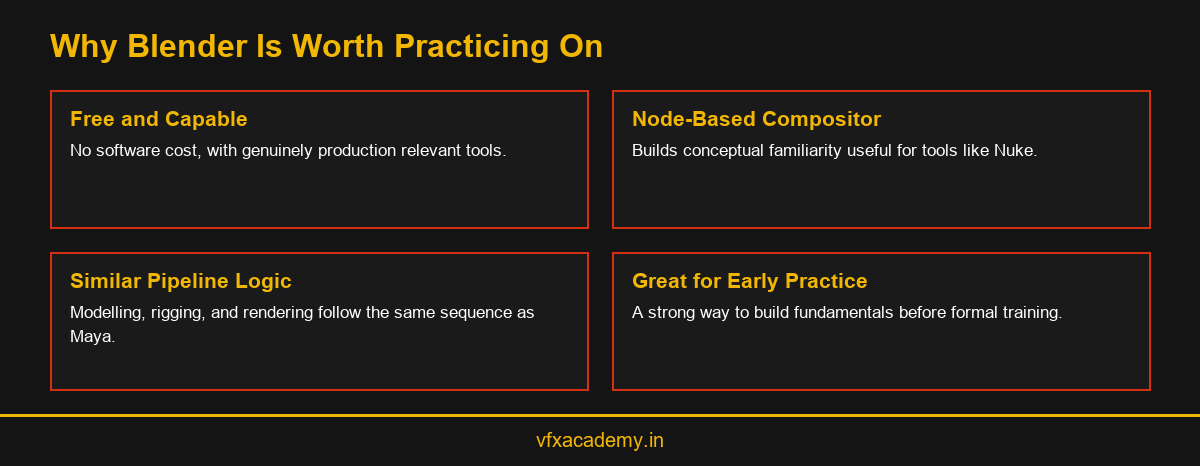
A well structured blender vfx course covers the same core stages as any serious 3D training, modelling, texturing, rigging, lighting, and rendering, using Blender’s own toolset to teach each stage. Blender’s built in node-based compositor also gives students early exposure to compositing concepts before they ever touch a dedicated compositing application like Nuke.
This node-based compositing exposure is particularly useful, since the underlying logic of connecting nodes to build a final image transfers conceptually to professional compositing tools even though the specific interface differs. Students who practice this early often find the conceptual leap to Nuke smaller than students encountering node-based thinking for the first time in a professional course.
Blender’s animation tools also cover the same fundamental principles taught in any structured animation program, timing, weight, and follow through, applied through keyframes on a rigged character. A student who works through several short animation exercises in Blender builds genuine, transferable understanding of these principles, even before touching Maya or any other commercial software.
Rendering in Blender also introduces students to render engine concepts, sample counts, and lighting setups that apply conceptually across almost any rendering software they encounter later. A student who understands why a render looks noisy or why a light is too harsh in Blender carries that understanding directly into any future software, since the underlying physics of light and rendering do not change between applications.
How Blender Compares to Maya for VFX Training
Maya remains the industry standard tool most VFX and animation studios expect junior artists to know, which is why structured courses like Rays VFX Academy’s centre their formal training on it. Blender, however, follows a broadly similar pipeline logic, modelling, texturing, rigging, and rendering in a comparable sequence, which means skills built through self-practice on Blender transfer reasonably well once formal Maya training begins.
For a closer look at how Maya specific training is structured for comparison, see Maya Animation Classes. Students often find that arriving at formal training already comfortable navigating a 3D viewport, understanding basic modelling concepts, and having practiced rigging fundamentals in Blender accelerates their progress once they begin structured Maya classes.
The differences that remain are mostly interface specific rather than conceptual. Menu locations, keyboard shortcuts, and certain naming conventions differ between the two applications, but the underlying question a student needs to answer at each stage, is this geometry clean, does this rig deform correctly, does this render pass separate cleanly, stays identical regardless of which software sits in front of them.
This is why Rays VFX Academy does not treat self-taught Blender experience as wasted time, even though formal classes centre on Maya. Instructors can quickly assess where a student’s Blender practice has built genuine understanding versus where habits need correcting, and adjust early guidance accordingly rather than starting every student from an identical blank slate.
Where Structured Training Still Matters
Free tool access solves the cost barrier, but it does not replace instructor feedback, a sequenced curriculum, or exposure to how a real studio pipeline actually operates under deadline pressure. Self-taught students frequently develop small technical habits, inefficient topology or inconsistent naming conventions, that go uncorrected without a knowledgeable instructor reviewing their work.
Rays VFX Academy’s studio-backed course, built on Rays3D’s 12+ years of production experience, gives students this missing structure and feedback loop, while still respecting that many applicants arrive having already practiced independently on free tools like Blender. Our Learn VFX From Scratch cluster covers this exact beginner journey, from self-taught practice through to structured, studio-backed training.
There is also a networking and exposure dimension that self-taught practice alone cannot provide. Studying inside a studio-connected environment means encountering working professionals, hearing about real project constraints, and building a peer network of fellow students, none of which a solo Blender practice routine at home can replicate no matter how disciplined the practice schedule is.
Getting the Most Out of Free Tool Practice
Students planning to practice on Blender before or alongside formal training should focus specifically on modelling fundamentals first, clean topology, sensible scale, and organised scene files, since these habits transfer most directly to any future software a student learns.
Avoid the temptation to chase visually impressive renders before mastering these fundamentals, since a technically weak model dressed up with dramatic lighting still creates problems once a student moves into rigging or a formal course environment. Our full 3D Animation Course and Diploma guide covers how these fundamentals fit into Rays VFX Academy’s wider curriculum for students ready to move from self-practice into structured training.
Keeping a simple practice log, noting what was built, what went wrong, and what was learned each session, also helps far more than most beginners expect. It builds the habit of reflective, deliberate practice rather than passive tutorial watching, and gives a genuinely useful reference point to discuss during a free demo class conversation with an instructor.
Bringing a small portfolio of Blender practice work to a free demo class also helps instructors give more specific, useful guidance from the very first conversation. Rather than starting from a blank assessment, an instructor reviewing existing practice work can point directly to habits worth keeping and ones worth correcting before formal training begins.
Conclusion
A blender vfx course, whether self-directed or structured, is a genuinely useful starting point because Blender is a capable, free tool that teaches transferable fundamentals. It works best as preparation for, not a replacement of, structured training that adds instructor feedback and real production exposure. Book a free demo class to see how Rays VFX Academy builds on whatever foundation you bring.
Frequently Asked Questions
Is Blender good enough for a real VFX career?
Yes, in the right hands. Blender is genuinely capable and used by some studios in production, though most studios still expect Maya proficiency for junior 3D roles.
Is Blender training the same as a structured VFX course?
No. Blender removes the software cost barrier, but structured courses add instructor feedback, a sequenced curriculum, and exposure to a real production pipeline.
Can I switch from Blender to Maya later without starting over?
Yes. Blender and Maya follow similar pipeline logic, so modelling, rigging, and rendering skills transfer reasonably well between the two tools.
Does Rays VFX Academy teach Blender in its course?
Rays VFX Academy centres its formal training on Maya integrated with Nuke, though students who practice independently on Blender arrive with a useful head start.
What can I learn for free using Blender?
Modelling, texturing, rigging, basic animation, and node-based compositing fundamentals can all be practiced using Blender at no software cost.
Is Blender’s compositor similar to Nuke?
Both use node-based compositing logic, so practicing in Blender builds conceptual familiarity that transfers to professional tools like Nuke, even though interfaces differ.
How much can I learn on Blender before joining a structured course?
Motivated self-taught students can build solid modelling and basic animation fundamentals, though structured feedback remains valuable for correcting habits that go unnoticed working alone.
Should complete beginners start with Blender or go straight to a course?
Either path works. Some students prefer testing their interest on Blender first, while others prefer structured guidance from day one to avoid developing uncorrected habits.

You may also like
Best 6-Month VFX and Animation Diploma, Explained