3D Animation Design: Skills, Software, and Tools You’ll Master
3D animation design pulls together technical software skill and creative judgment, and understanding exactly which skills and tools a course should cover helps you avoid programs that only scratch the surface. Many course pages simply list software logos without explaining depth of coverage. This guide walks through the core skills and software behind serious 3D animation design training, including how Rays VFX Academy structures Maya and pipeline training inside its studio-backed course.
Key Takeaways
- 3D animation design combines technical skills, modelling, rigging, texturing, and creative skills, timing, composition, and staging.
- Maya remains the industry standard software, while Blender offers a free, capable alternative for early practice.
- The strongest training connects each software skill directly to how it is used inside a real production pipeline.
The Core Skills Behind Strong 3D Animation Design
3D animation design rests on a mix of technical and creative skills that reinforce each other. Technical skills include modelling clean geometry, rigging functional control systems, and setting up materials and lighting correctly. Creative skills include timing, staging a shot so the eye reads it correctly, and understanding how weight and force should look in a believable movement.
Students sometimes assume creative instinct alone is enough, but without technical grounding, even a strong creative idea becomes difficult to execute cleanly. Equally, strong technical skill without creative judgment produces work that is competent but forgettable. A well structured course builds both together rather than treating them as separate tracks a student can choose between.
This is part of why Rays VFX Academy structures its training around a working studio pipeline rather than isolated skill drills. Students practising rigging, for example, do so on models built earlier in the same course, so technical exercises stay connected to a creative outcome rather than existing as abstract software practice disconnected from any real shot.
A useful way to test whether a course is teaching both sides properly is to ask what feedback students receive on finished work. If feedback focuses only on whether a tool was used correctly, the course is likely skewed toward technical instruction alone. If feedback also addresses timing, staging, and whether a shot communicates its intended idea, the course is more likely developing genuine 3D animation design skill rather than software operation alone.
Maya: The Industry Standard Software
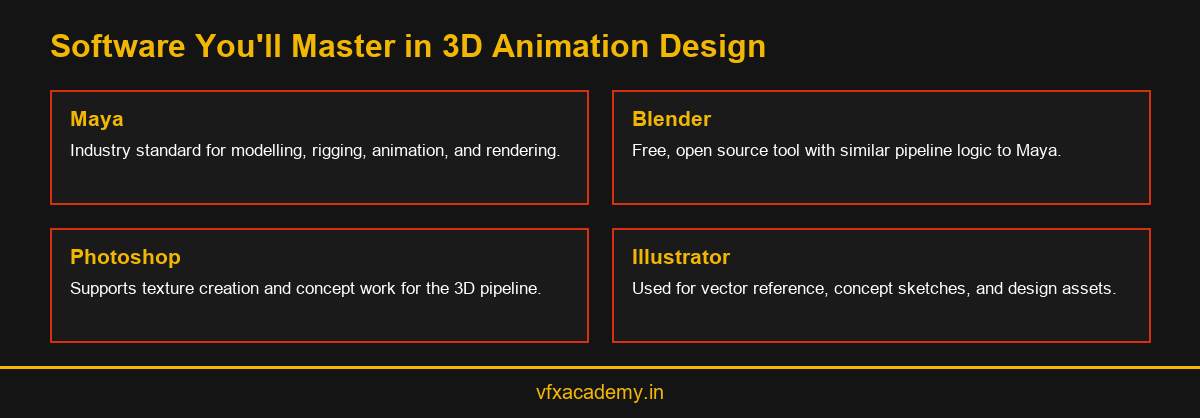
Autodesk Maya remains the most widely used software across professional 3D animation and VFX studios, covering modelling, rigging, animation, and rendering within a single connected application. Its dominance in the industry is precisely why Rays VFX Academy centres its 6-month, 400-hour course around Maya training, ensuring students learn the tool most likely to match what studios expect from a junior hire.
Maya training at Rays VFX Academy connects directly into Nuke through Maya-Nuke integration and 3D Nuke workflows, so students see how their modelling and animation output actually reaches the compositing stage rather than treating Maya as a standalone subject. For a closer look at how this software specific training is sequenced, see Maya Animation Classes.
Learning Maya properly also means learning its scripting and automation tools eventually, even if that comes later in a student’s development. Studios frequently rely on custom scripts and tools built on top of Maya’s core functionality, and artists who understand at least the basics of how these tools work tend to integrate into a production team more smoothly than those who only know the default interface.
Blender: A Free Companion for Early Practice
Blender is a free, open source 3D application that has grown significantly in capability over recent years, now used by some studios in production alongside commercial tools. For students who want to start practising modelling and animation concepts before formal training begins, Blender offers a genuinely capable, cost-free starting point.
Because Blender follows similar pipeline logic to Maya, modelling, then texturing, then rigging, then rendering, skills built in one tool transfer reasonably well to the other. Students interested in exploring Blender in more depth before or alongside structured training can read our dedicated Blender VFX Course cluster.
Some students worry that practising on Blender before formal training will create bad habits that need unlearning later. In practice, the opposite is usually true. A student who arrives already comfortable navigating a 3D viewport, rotating a camera, and understanding basic modelling concepts tends to progress faster once formal Maya training begins, since the interface differences are far smaller than the underlying conceptual overlap between the two tools.
Beyond the Big Two: Photoshop, Illustrator, and Rendering Tools
3D animation design rarely happens in isolation from 2D image tools. Photoshop and Illustrator support texture creation, concept sketches, and reference material that feed directly into the 3D pipeline before a single model is built. Students who skip these fundamentals often struggle later when asked to paint a custom texture or prepare reference material for a new character.
Rendering knowledge also deserves more attention than it usually receives in shorter courses. Understanding how lighting setups and render passes affect a final image helps students avoid wasted time troubleshooting render errors that a stronger technical foundation would have prevented in the first place. These skills sit inside Rays VFX Academy’s wider curriculum rather than being treated as an afterthought.
Colour theory and composition, borrowed from traditional design education, also play a bigger role in 3D animation design than many beginners expect. Understanding how colour and framing guide a viewer’s eye applies just as much to a rendered 3D shot as it does to a painting or photograph, which is why a genuinely well-rounded course touches on these principles rather than treating 3D work as purely technical software operation.
Students frequently underestimate how much of their final grade or portfolio quality comes down to these supporting skills rather than raw modelling ability. A technically simple model, well textured and thoughtfully lit, often reads better in a portfolio than a technically ambitious model let down by flat lighting or a poorly chosen colour palette.
How These Skills Connect to Compositing
The final measure of strong 3D animation design skill is how cleanly a finished render integrates into the compositing stage. A model built with sloppy geometry or a poorly set up render can create hours of unnecessary work for a compositor trying to fix problems that should have been caught earlier in the pipeline.
This is why Rays VFX Academy teaches 3D animation design skills alongside compositing rather than as a separate subject. For students who want to understand this handoff in more depth, our VFX Compositing Course cluster explains how Nuke, Mocha, and Silhouette fit alongside Maya in a complete production pipeline, and our full 3D Animation Course and Diploma guide covers how all these skills fit together across the full curriculum.
Students who build this connected understanding early tend to produce cleaner, more efficient work throughout their careers, since they instinctively build models and set up renders with the next stage of the pipeline in mind, rather than treating each stage as a closed, unrelated task handed off without context.
Rays3D’s own production history, 12+ years of studio work and 100+ VFX and 3D projects released, means the instructors teaching this connected approach have lived through it professionally rather than describing it purely in theory. That practical grounding shapes how closely the course ties 3D animation design skills to the compositing stage that follows.
Conclusion
Strong 3D animation design training combines technical software skill with creative judgment, taught together rather than separately. Maya remains the industry standard, Blender offers a capable free alternative, and supporting tools like Photoshop and Illustrator round out a complete skill set. Book a free demo class to see how Rays VFX Academy connects these skills into one working pipeline.
Frequently Asked Questions
What skills does 3D animation design actually require?
It requires both technical skills, modelling, rigging, texturing, and rendering, and creative skills such as timing, staging, and understanding weight and movement.
Is Maya or Blender better for learning 3D animation design?
Maya is the industry standard used by most studios, while Blender is a strong free alternative for early practice. Both teach similar underlying pipeline logic.
Do I need to learn Photoshop for 3D animation design?
Yes, in most cases. Photoshop and Illustrator support texture creation and concept work that feeds directly into the 3D modelling and rendering pipeline.
How long does it take to master 3D animation design software?
Basic proficiency can develop over a few months of structured practice, though genuine production level skill typically takes sustained, guided practice over a longer period.
What software does Rays VFX Academy teach for 3D animation design?
Rays VFX Academy centres its training on Maya, integrated with Nuke for compositing, alongside Photoshop and Illustrator for supporting texture and concept work.
Can I learn 3D animation design without prior art training?
Yes. Structured courses build technical and creative skills together from fundamentals, so prior formal art training is not required to begin.
Why does rendering knowledge matter in 3D animation design?
Rendering determines how a finished 3D shot actually looks and how cleanly it integrates into compositing, making it a core skill rather than a minor technical detail.
How does 3D animation design connect to VFX work?
Well designed 3D assets and clean renders make the compositing stage significantly easier, which is why the two disciplines are taught together in a production-focused course.

You may also like
Diploma in 3D Animation: Full Curriculum Breakdown
2D vs 3D Animation Courses: Which Should You Choose